



给你的网站添加一个私密评论功能,该教程几乎适配99%的WordPress主题,这里以子比主题为例。
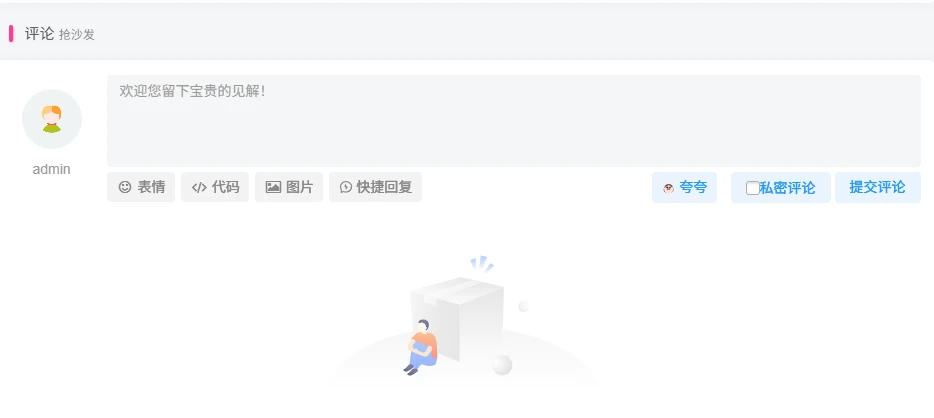
教程如下
打开子比主题的 functions.php 文件,在最后一个 ?> 的前面添加以下代码:
//私密评论
function liao_private_message_hook( $comment_content , $comment){
    $comment_ID = $comment->comment_ID;
    $parent_ID = $comment->comment_parent;
    $parent_email = get_comment_author_email($parent_ID);
    $is_private = get_comment_meta($comment_ID,\'_private\',true);
    $email = $comment->comment_author_email;
    $current_commenter = wp_get_current_commenter();
    if ( $is_private ) $comment_content = \'#私密# \' . $comment_content;
    if ( $current_commenter[\'comment_author_email\'] == $email || $parent_email == $current_commenter[\'comment_author_email\'] || current_user_can(\'delete_user\') ) return $comment_content;
    if ( $is_private ) return \'<span style=\"color:#A6A6A6\"><i class=\"fa fa-lock fa-fw\"></i>该评论为私密评论</span>\';
    return $comment_content;
}
add_filter(\'get_comment_text\',\'liao_private_message_hook\',10,2);
function liao_mark_private_message( $comment_id ){
    if ( $_POST[\'is-private\'] ) {
        update_comment_meta($comment_id,\'_private\',\'true\');
    }
}
add_action(\'comment_post\', \'liao_mark_private_message\');
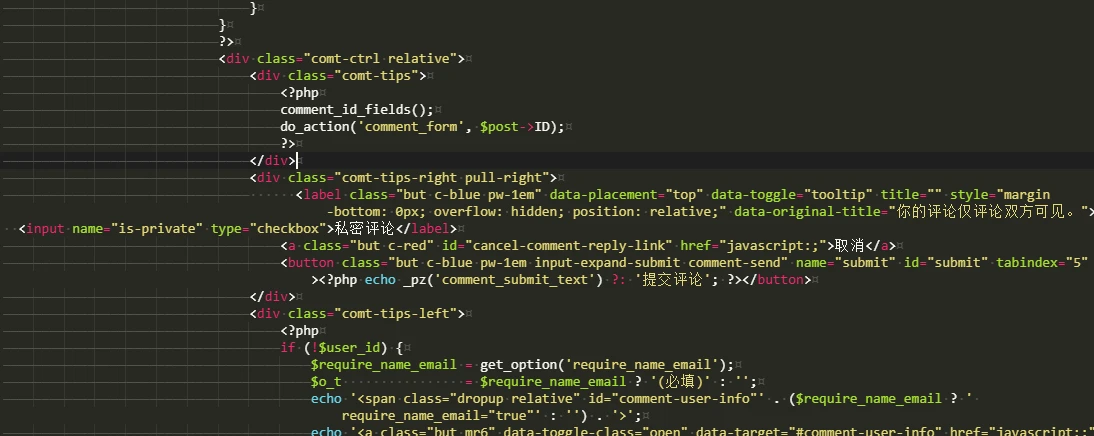
打开子比主题的 comments.php 文件,搜索提交评论,在其上方添加下方代码之后保存即可。(如图)
文件路径:/wp-content/themes/zibll/template/comments.php
<label class=\"but c-blue pw-1em\" data-placement=\"top\" data-toggle=\"tooltip\" title=\"\" style=\"margin-bottom: 0px; overflow: hidden; position: relative;\" data-original-title=\"你的评论仅评论双方可见。\">
  <input name=\"is-private\" type=\"checkbox\">私密评论</label>
如图位置
重要提示
如有解压密码: 看下载页、看下载页、看下载页。
源码工具资源类具有可复制性: 建议具有一定思考和动手能力的用户购买。
请谨慎考虑: 小白用户和缺乏思考动手能力者不建议赞助。
虚拟商品购买须知: 虚拟类商品,一经购买打赏赞助,不支持退款。请谅解,谢谢合作!
© 版权声明
THE END


















暂无评论内容